HQ CONSOLE
The money side of your side hustle, handled
Bills across every account, what sold and what each sale made, plus the tasks, home and car dates that keep the rest of life on schedule. One fast app on your phone and at your desk.
30 days free, no card. Then $79 a year or $9.99 a month. Installs to your home screen from the browser, with nothing to download from a store.
WHAT IT DOES
Six jobs, one place, starting with the money
Pick the modules you need. Every one of them shares the same command bar, the same calendar, and the same records, so nothing has to be entered twice.
Bills without the spreadsheet
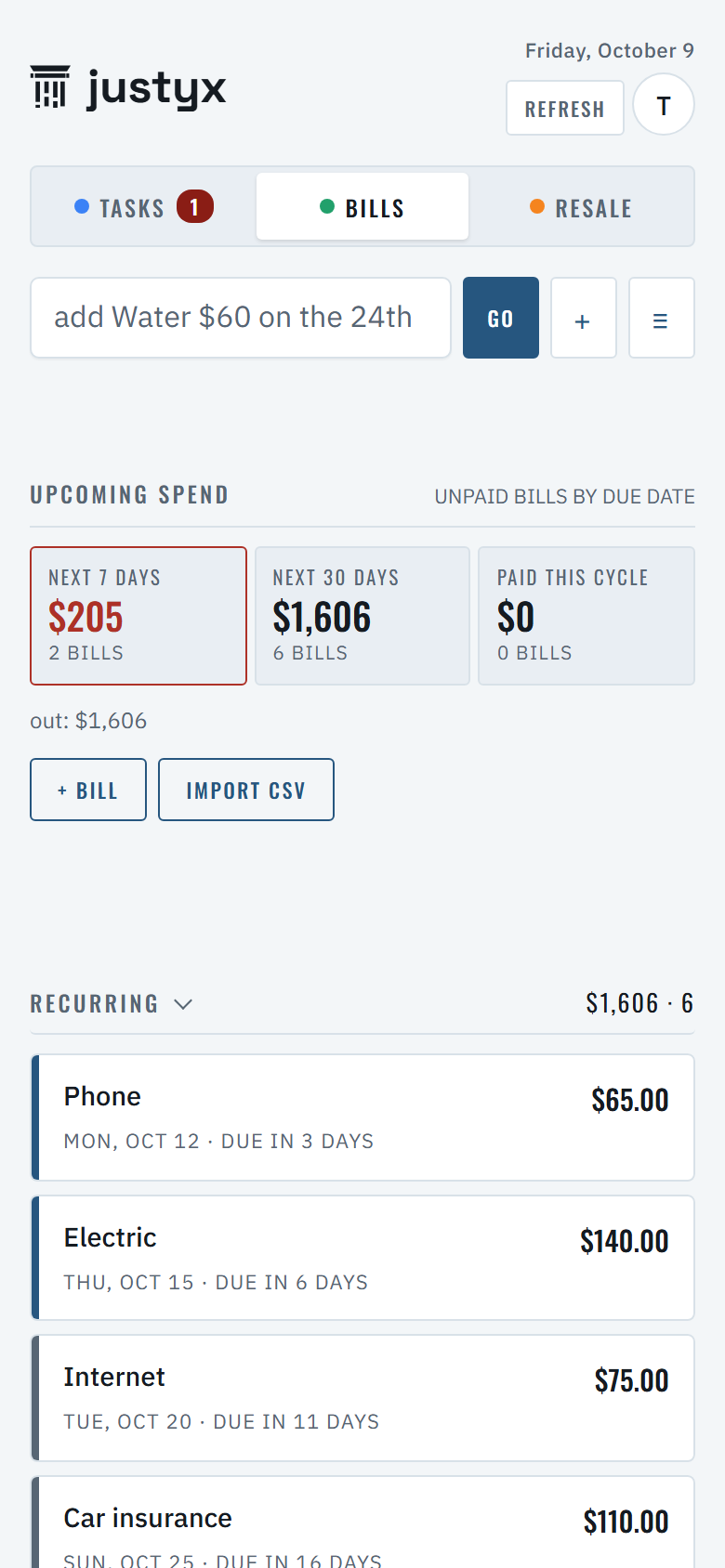
Upcoming spend at a glance, recurring and variable bills sorted, cash runway by account, and a statement import that works with any bank’s CSV. No bank login handed to anyone.
Resale, by the numbers
Listings, sales, shipping tasks, and on every sale the fees, shipping and item cost, so Net is a number, not a guess. Fee presets for eBay, Poshmark, Mercari, Depop, Whatnot, Etsy, Facebook and OfferUp, editable to match the payout. Month and year totals.
Statements in, no bank login
Drop in the CSV your bank already gives you. HQ sorts it, flags the repeat charges, and shows what is left after the bills due this month.
Tasks that schedule themselves
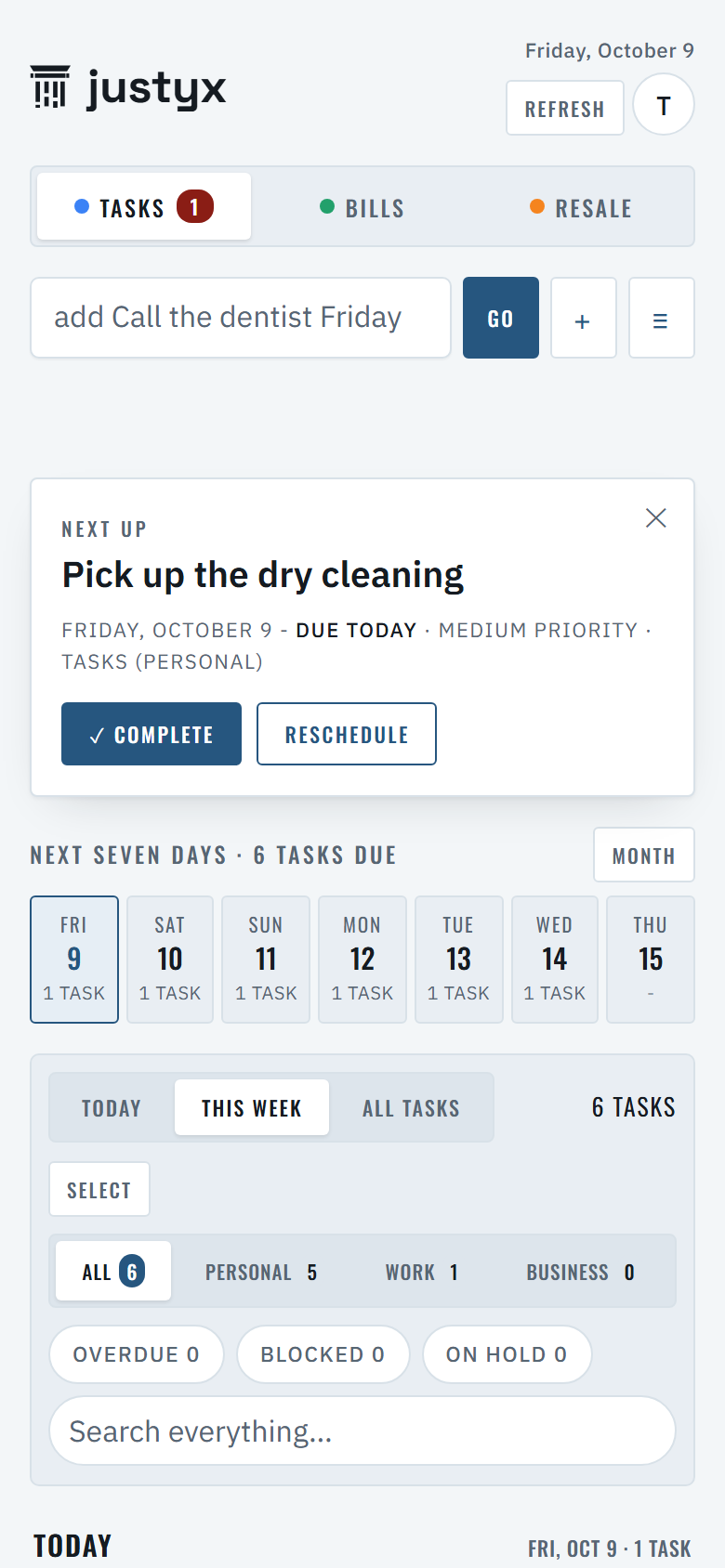
Type a line, get a task with a date. Projects, recurring chores, and “also due” reminders show up on the day they matter. Paste a whole list and every line becomes a task.
Home and car
Upkeep schedules, home projects with budgets, and a vehicle log, so the filter change and the registration renewal never sneak up.
Snap a screenshot
Photograph a bill, a receipt, or a to-do list and HQ turns it into records you can check off. The assistant and screenshot reading use AI. Every answer is labeled, and it can be wrong, so check it before you act on it.
WHAT EACH SALE MADE
Net on every sale, not a guess
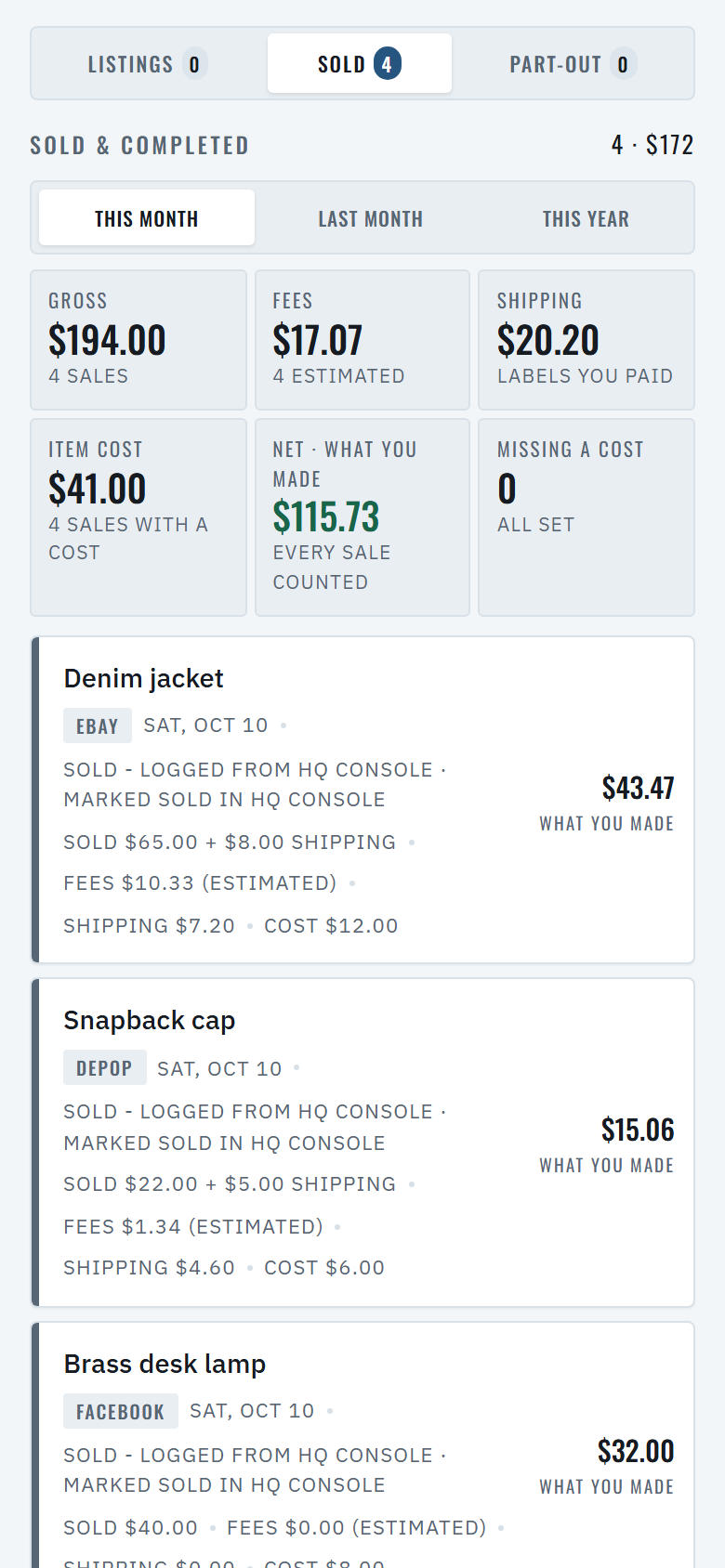
Mark an item sold and HQ asks for four numbers: shipping charged, shipping paid, platform fees, and what the item cost you. The Sold tab does the rest.
- 01Fees filled in for you
Presets for eBay, Poshmark, Mercari, Depop, Whatnot, Etsy, Facebook and OfferUp, marked as estimates. Type the number from your payout and it takes over.
- 02Net as a number
Sold for, plus shipping charged, minus fees, the label and the item cost. A sale with no cost says add cost instead of showing a figure that is too high.
- 03Totals for the month and the year
This month, last month and this year: gross, fees, shipping, item cost and Net, with a count of sales still missing a cost.
COMPARED
What the usual apps leave out
| Feature | HQ Console | Monarch | YNAB | Flippd |
|---|---|---|---|---|
| Price | $79 a year | $99.99 a year | $109 a year | $99.99 a year |
| Trial | 30 days, no card | 7 days | 34 days, no card | Free up to 20 items, no card |
| Bank login required | No, you import statements | Built around bank links; manual accounts possible | Optional | Not stated |
| Bills and cash runway | Yes | Yes | Yes | No |
| Lists or delists on marketplaces | No, by design | Not applicable | Not applicable | No, by design |
| Resale sales next to your bills | Yes | No | No | No |
| Tasks, home and car dates | Yes | No | No | No |
| Calendar feed | Yes | No | No | No |
Prices and features from each company’s public pages on October 10, 2026. Monarch, YNAB, and Flippd are trademarks of their owners.
HOW IT WORKS
Modules you pick. Dates everywhere.
- 01Choose your modules
Start with Tasks and Bills. Add Reselling, Home, Car, or Work whenever you want. Nothing you skip gets in your way.
- 02Type in plain words
bill Water $60 monthly on the 24thbecomes a recurring bill, and one tap marks it paid.call the dentist Fridaybecomes a task on Friday. No forms to fill. - 03Subscribe your calendar
Every dated task and bill shows up in the Calendar app on iPhone, in Google Calendar, or in Outlook. Nothing to sync by hand.
- 04Share it, or don’t
Invite a partner to the same HQ, or keep it to yourself. Delete your account and every record goes with it.
PLANS
One plan. Thirty days to decide.
HQ YEARLY
$79 a year, about $6.58 a month
- Every module: Tasks, Bills, Reselling, Home, Car, Work
- Bank statement import from any bank, screenshot capture
- Calendar feed to iPhone, Google Calendar, or Outlook
- Share your HQ with a partner
- Everything we add next
- Full refund if you cancel within 14 days of a yearly charge
- Reminder email 30 to 45 days before each renewal
HQ MONTHLY
$9.99 a month
- Everything in Yearly
- Cancel any month in Account, no fee, no reason needed
- Switch to yearly whenever you like
Every account starts with 30 days free, no card. Paid plans are not open yet. HQ is free until they are, your 30 days start the day they open, and you get at least 30 days notice by email before anything is due. Subscriptions renew automatically and can be canceled online at any time. See the Subscription Terms.
QUESTIONS
Before you sign up
What happens after the 30 days?
You pick yearly or monthly and pay in the app. If you do nothing, HQ keeps your records safe and read-only for 90 days, and you can export them at any time. No card is taken during the trial, so nothing is charged by surprise.
Why not free?
Many free apps in this category pay for themselves with ads or by monetizing the data you put in. HQ does neither, so the only person we work for is the one paying $79 a year.
Does it connect to my bank?
Not directly, on purpose. You export a statement from your bank’s website and drop it in. HQ never holds your bank login, and nothing about your accounts is sold or shared.
Is there an app in the App Store?
HQ is a web app that installs to your home screen from the browser, so it updates itself and works the same on iPhone, Android, and desktop. A store listing may come later.
What happens to my data if I leave?
Delete your account from the Account sheet. Your sign-in stops at once and an hourly job empties every record, usually within hours. You can export everything before you do.
Who answers when something breaks?
The founder. HQ is run by one person who uses it every day, and support@justyxco.com goes to her inbox. You get a real reply, usually within one business day, never a bot.
Does HQ show what I actually made on a sale?
Yes. Each sale carries the price, the shipping you charged and the label you paid, the platform fees, and what the item cost you, and HQ shows the Net on that sale plus totals for this month, last month and this year. Fees start as an estimate from the platform’s published rate, for eBay, Poshmark, Mercari, Depop, Whatnot, Etsy, Facebook and OfferUp, and you can replace the estimate with the number from your payout. Net is a bookkeeping figure for your own records.
Is HQ tax advice?
No. HQ organizes what you enter, such as the business-or-personal flag on a bill and the totals on the Sold tab. It gives no tax advice, files nothing, and is not a substitute for a tax professional. Check the figures with one before you file.
Where is the fine print?
HQ Console has its own Terms of Service, Privacy Policy, Information Security Program, and Accessibility Statement.
Ready when you are
Sign-up takes a minute. The first task you type is already on the calendar.